Counter Reports
The Neuron® contains runtime counters of different types. They reside in the collection RuntimeCounters that contain a collection of RuntimeCounter objects. They are efficiently maintained in-memory, so incrementing them frequently does not affect performance greatly. Each counter is either persisted after one minute of no activity, or after 15 minutes of regular activity (at least one action per minute). Since the most recent counter value is often stored in-memory, the database collection is not the most reliable source of what counter values exist. The counter keys can be taken from the collection, but the most recent values should be retrieved using script. The script functions DecCounter, FlushClunters, GetCounter, GetCounters and IncCounter can be used to access runtime counters from script.
Note: RuntimeCounters is a namespace in the underlying code. This means that the SELECT statement select count(*) from RuntimeCounters will fail, since the RuntimeCounters reference will refer to the namespace instead of the collection. To make SELECT statements referring to counters, use double quotes around the name, to ensure the name is treated as a label, and not a reference to something else, as follows: select count(*) from "RuntimeCounters". You can also use the script functions.
Counter Script primer
Before delving into counter reports, first some background in how to extract information about counters using script. Each counter is represented by a RuntimeCounter object. You can select data from the database, either by referring to the class name of the counter object RuntimeCounter, or to the collection name, but using double-quotes to avoid referring to the namespace: "RuntimeCounters". (Should there be another class named RuntimeCounter in the code-behind, you need to refer to the fully-qualified name of the class, rather than the local name. Referring only to the local name would return a vector of the different class types matching the local name reference.)
Getting the properties avialable in persisted objects of a class, use the properties() function:
properties(RuntimeCounter)
This gives:
["ObjectId", "Key", "Counter"]
To extract available counters, we therefore do as follows: (Note here the use of the script function GetCounter() to get the value in memory, if any.
SELECT
	Key,
	GetCounter(Key) Value
FROM
	RuntimeCounter
ORDER BY
	Key
There will most probably be a lot of counters there. Some are communication-related, others are service-related. Others relate to specific Neuron-operations that may be of interest for statistical purposes or billing.
Counter differences
The script engine contains a feature referred to as subtraction of two dictionaries that makes it simple to compare counters from two different points in time. Since each key is unique, you can create a dictionary (object) of the counter values as follows:
Sample1:={};
foreach Counter in (SELECT Key FROM RuntimeCounter) do
	Sample1[Counter]:=GetCounter(Counter);
At a later time you similarly do:
Sample2:={};
foreach Counter in (SELECT Key FROM RuntimeCounter) do
	Sample2[Counter]:=GetCounter(Counter);
To get the differences of samples, you simply do:
Sample2-Sample1
Here, each object does not have to have the same propery values. If a property does not exist in one of the samples, but exists in the other, it is treated as having the zero element (in the underlying group, here being Integers).
Note: Once a set of counters is converted into a dictionary, as shown above, it can be persisted as a property itself in an object by itself in the database. The reports repsented below has this feature to save snapshots from the counters collection using labels that can be retrieved later for comparison purposes.
If many of the counters are the same between snapshots (i.e. there are many zeroes), we can remove all zeroes and create a reduced difference set as follows. First, we convert the dictionary into a vector, and then use the subset construction to create a smaller vector consisting of only objects whose values are not zero. By transposing this result, we get the result in tabular form.
Diff:=[foreach P in Sample2-Sample1 : P];
[P in Diff:P.Value!=0]T
In our example above, if Sample1 and Sample2 are made in relative close proximity, only a few counters have been modified. The result could look something like:
[[[XMPP.Server.Set.pubsub, 1]],
 [[XMPP.Server.Get.ping, 221]],
 [[E2EE.Counter, 11]]]
The example above shows 1 XMPP Publish/Subscribe operation, 221 XMPP ping operations to maintain connectivity and 11 End-to-End Encrypted stanzas communicated between samples.
Counter Labels
Samples in counter-reports described below are stored using Labels. These labels are stored in two different collections, depending on report: CounterLabels and BillableLabels. To get available labels, you can execute simple SELECT statements:
select Label from CounterLabels
or:
select Label from BillableLabels
Counter Reports
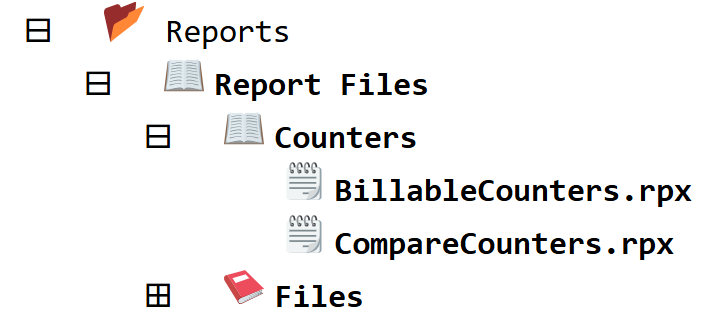
File-based reports make working with script easier. They allow you to parametrize script, and present the results in a more user-friendly manner (meaning, you don’t have to know script to know the results). There are two reports available that can be used to extract information from runtime counters. From Sources & Nodes in the administrative portal, you find the reports here:
Compare Counters Report
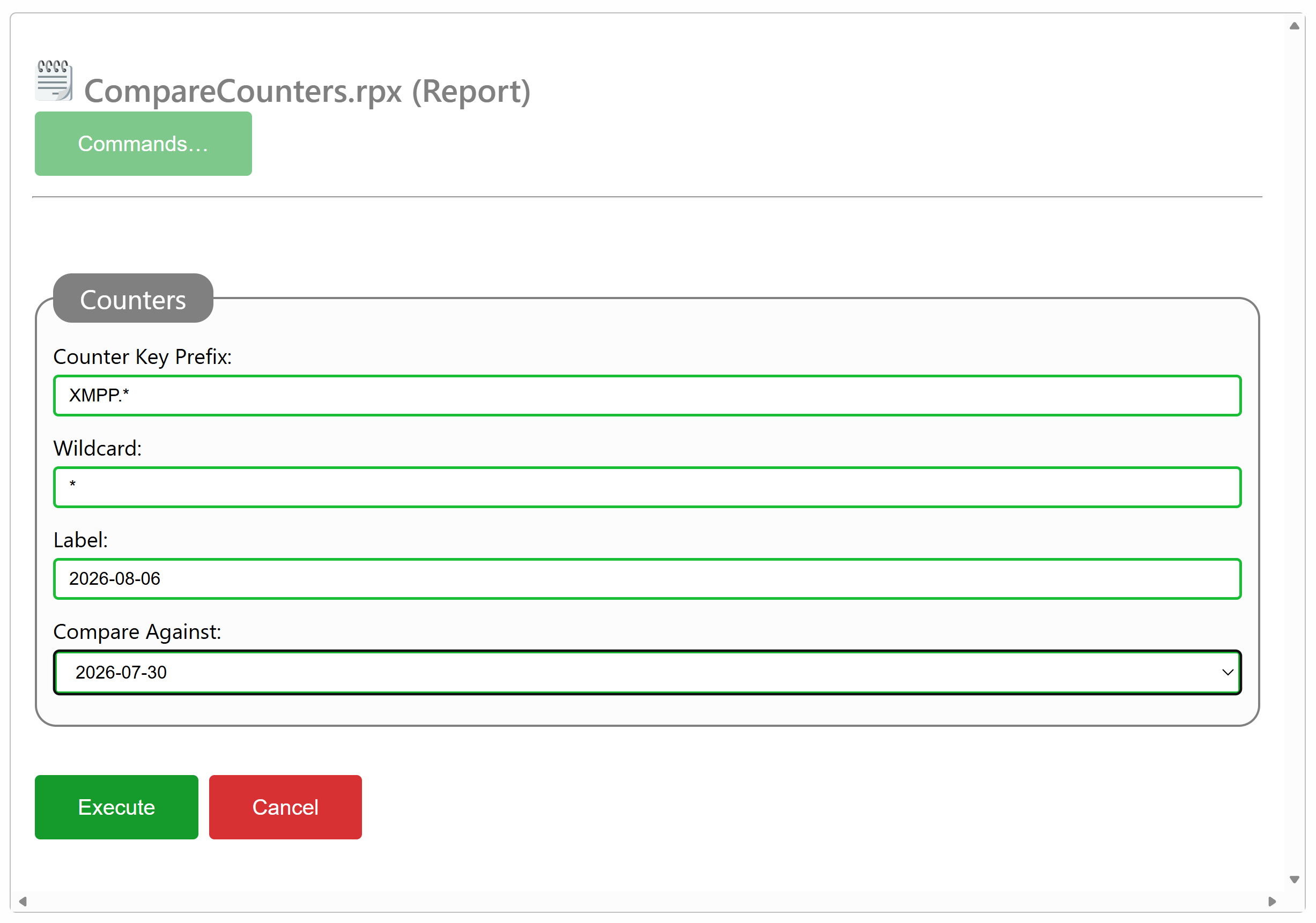
The Compare Counters report lets you compare two sets of samples with each other, taken at separate times. It also lets you label each sample. You select the counters you wish to compare by providing a Counter Key Prefix, which may or may not use a wildcard, which you can also specify. In the following example XMPP-related counters will be compared:
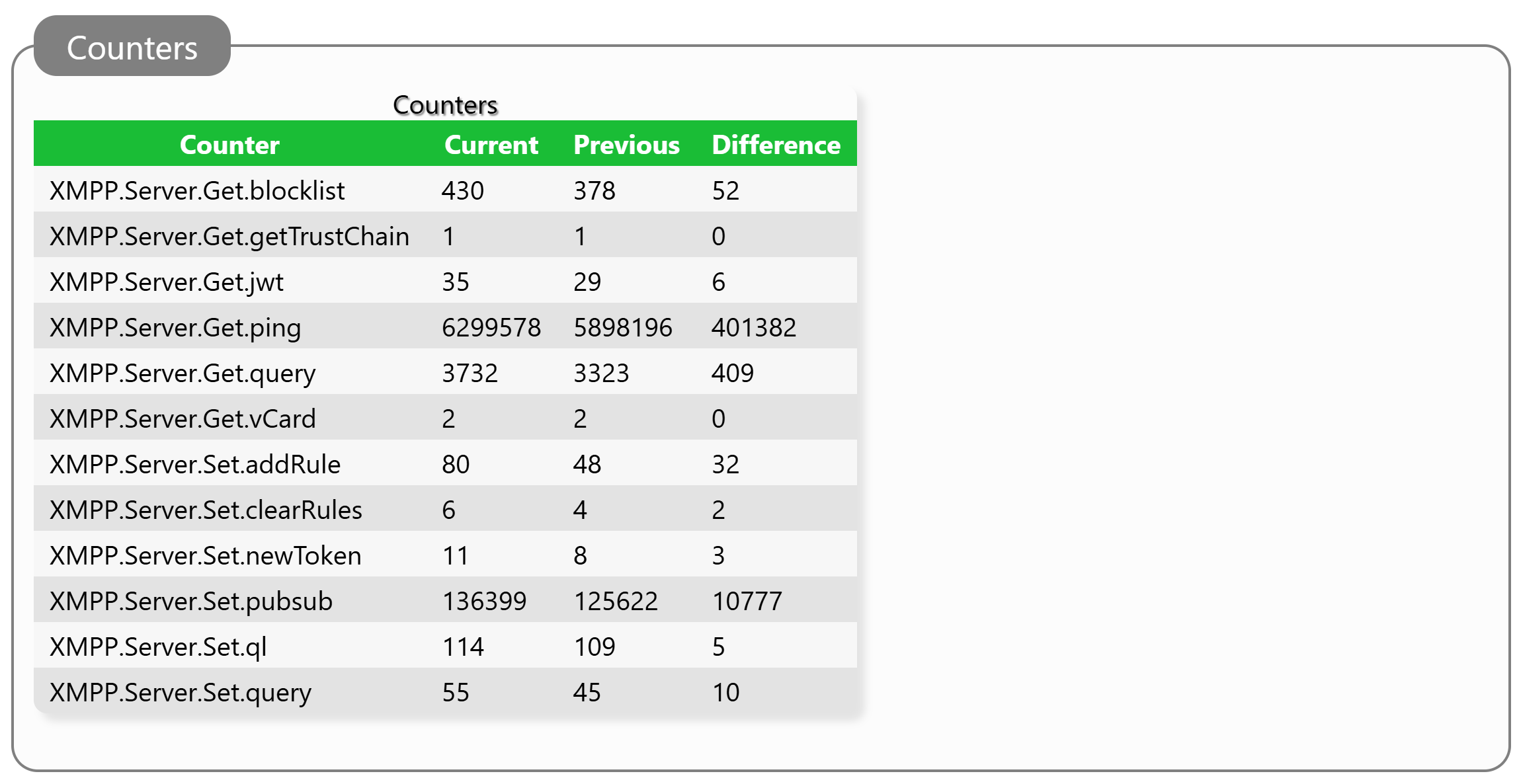
For our example, a brief reduced result set might look as follows:
Billable Counters Report
Certain counters could be referred to as billable counters, meaning, that some operators might base billing on server usage based on these counters. A special counter-comparison report exists that selects these counters automatically. All the operator needs to do is provide label names, to get suitable comparisons.
Example of what counters are included in the billable counters report, see the following report result comparing two snapshots close to each other (leaving results as zero):
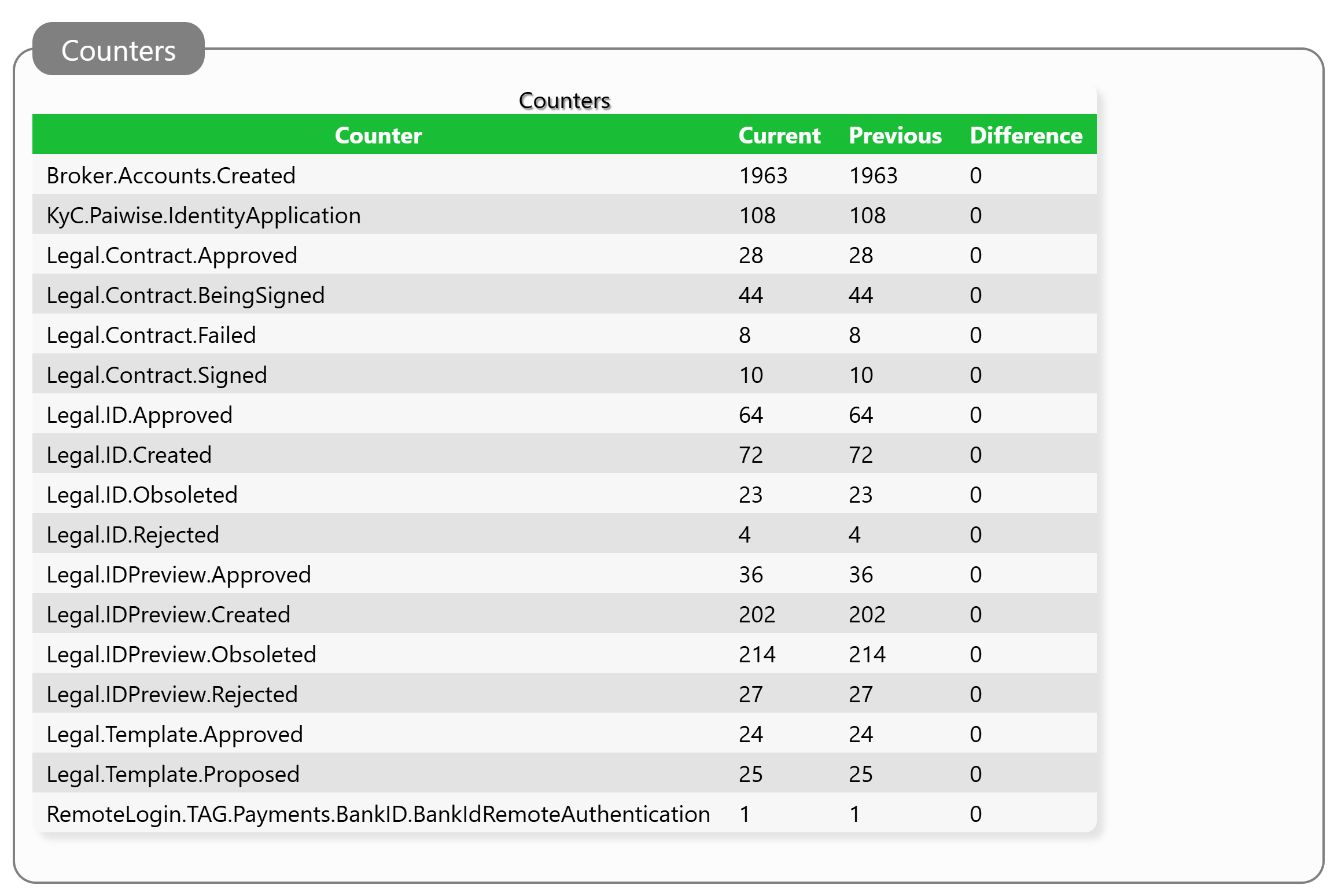
The counters that appear have the following meaning:
| Counter | Description |
|---|---|
Broker.Accounts.Created |
Number of XMPP accounts created. |
KyC.*.IdentityApplication |
Number of identity applications analyzed by KyC service * |
Legal.Contract.Approved |
Number of smart contracts approved. |
Legal.Contract.BeingSigned |
Number of contracts receiving digital signatures. |
Legal.Contract.Failed |
Number of contracts that failed. |
Legal.Contract.Signed |
Number of contracts reaching the signed state. |
Legal.ID.Approved |
Number of Identity Applications that were approved. |
Legal.ID.Created |
Number of Identity Applications that were created. |
Legal.ID.Obsoleted |
Number of Identity Applications that were obsoleted. |
Legal.ID.Rejected |
Number of Identity Applications that were rejected. |
Legal.IDPreview.Approved |
Number of Identity Preview Applications that where approved. |
Legal.IDPreview.Created |
Number of Identity Preview Applications that where created. |
Legal.IDPreview.Obsoleted |
Number of Identity Preview Applications that where obsoleted. |
Legal.IDPreview.Rejected |
Number of Identity Preview Applications that where rejected. |
Legal.Template.Approved |
Number of smart contract templates that were approved. |
Legal.Template.Proposed |
Number of smart contract templates that were proposed. |
RemoteLogin.* |
Number of Remote Login API authentication initiations made using authentication service *. |
Posts tagged #counters
No more posts with the given tag could be found. You can go back to the main view by selecting Home in the menu above.